
Parivahan Duplicate RC Status: The RC, i.e., the registration certificate of any vehicle, is an important document without which driving on public roads is completely illegal in India. If caught driving without an RC, then a fine is imposed, and you may have to face other consequences.
The need to apply for duplicate RC arises when the original is lost somewhere or the details mentioned on it are not clearly visible. If you have applied for a duplicate RC and want to check its status, then you have come to the right place; here we have shared the complete process.
Parivahan Duplicate RC Status
It takes a maximum of a month to get a duplicate RC after the application submission, because initially 4-5 days are spent in verification of the application, then about 7 to 10 days in RTO approval, and about 5 to 7 days in printing, and once it is printed, then it takes about 3-5 days to receive it.
The status for the duplicate RC can be checked through the Privahan Sewa portal, for which you must have your application number. By checking the status, you can find out what is happening with your application for the duplicate registration certificate.
| Document Name | Duplicate RC (Registration Certificate) |
| Purpose | Issued when original RC is lost, damaged, or details are not clearly visible |
| Processing Time | Up to 30 days after application submission |
| Verification Time | 4–5 days for application verification |
| RTO Approval Time | 7–10 days |
| RC Printing Time | 5–7 days |
| Delivery Time | 3–5 days after printing |
| Requirement to Check Status | Application Number or Vehicle Registration Number |
| Authority Responsible | Regional Transport Office (RTO) |
| Final Delivery Mode | Sent by post to the applicant’s address |
| Status Check Portal | https://parivahan.gov.in/ |
How to check the duplicate RC status?
To check the duplicate RC status for your vehicle, please go through the step-by-step instructions available below.
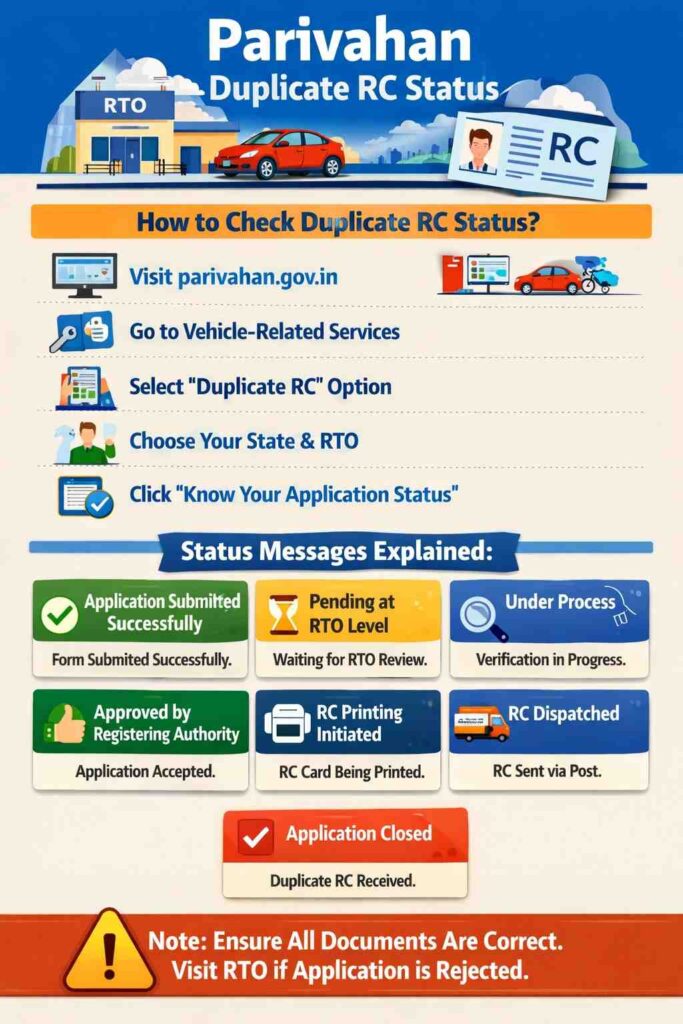
- Visit the Privahan Sewa portal at https://parivahan.gov.in/.
- Jump to the section of Vehicle-Related Services, and click on the Other Services option.
- Under the section of Online Services, you will see the option of Duplicate RC; tap on it.
- Select your state and then your RTO (Regional Transport Office), and click the Processed button.
- Go to the header menu bar, and tap on the option of Status, and then click on the Know Your Application Status option.
- Enter your application number or vehicle registration number; fill in the CAPTCHA, as shown on the webpage; and then click on the Submit button.
By going through the instructions given above, you will see the status as Application Submitted Successfully, Pending at RTO Level, Under Process, Approved by Registering Authority, RC Printing Initiated, RC Dispatched, or Application Closed.
What’s the meaning of Duplicate RC Status messages?
On checking the status for the duplicate RC, different messages are shown; you may not be aware of them. Below, we have explained each message:
- Application Submitted Successfully: It means that your application for a duplicate registration certificate has been successfully submitted, and its processing will start soon.
- Pending at RTO Level: It means that your application has been received by your nearest RTO office, but it is yet to be reviewed.
- Under Process: It means that the RTO officer is checking your details and verifying the documents provided by you.
- Approved by the Registering Authority: This means that your application for a duplicate RC has been accepted at the RTO.
- RC Printing Initiated: This means that the smart card of the Registration Certificate, i.e., RC, has been sent for printing, and it is currently in process.
- RC Dispatched: This means that your duplicate RC has been printed and sent by post. You will receive it soon.
- Application Closed: It means that your application has been processed, i.e., you have received your duplicate RC.
If your application contains any errors, it may be rejected. Your application for a duplicate RC is approved only if all the documents you provide are correct. If any single document is unavailable, your application won’t be processed.
If your application for a duplicate RC is rejected, then instead of applying online again, it is better to go to the regional transport office and submit your application. While going to the RTO, make sure that you take your vehicle along with you and keep all the documents with you.