E-Challan Check: E challans are the fines which are issued to our vehicle in case of RTO rules violations; they are generally generated via camera detection. Sometimes they are also generated by the traffic police. If you are not aware whether any e-challan has been issued against your vehicle, you can check it easily.
Checking an E Challan is a very easy and hassle-free process. Anyone, regardless of their educational background, can easily view their e-challan and even pay any pending ones. Be sure to read this article thoroughly so you don’t miss any details related to checking your e-challan.
E Challan Check
Whether the e-challan for your vehicle is issued manually by the tariff across or automatically via digital camera, checking it is quite easy and simple. For the convenience of the vehicle owners, the Ministry of Road Transport and Highways has introduced a portal called e-Challan.
On the e-Challan portal, you only need to fill in the basic details like challan number, vehicle number or driving licence number to check the e-challan. The portal is https://echallan.parivahan.gov.in/; for your convenience, below we also have shared the step-by-step instructions to check it.
How to check e-challan?
You may check the e-Challan by going through the step-by-step instructions available below.
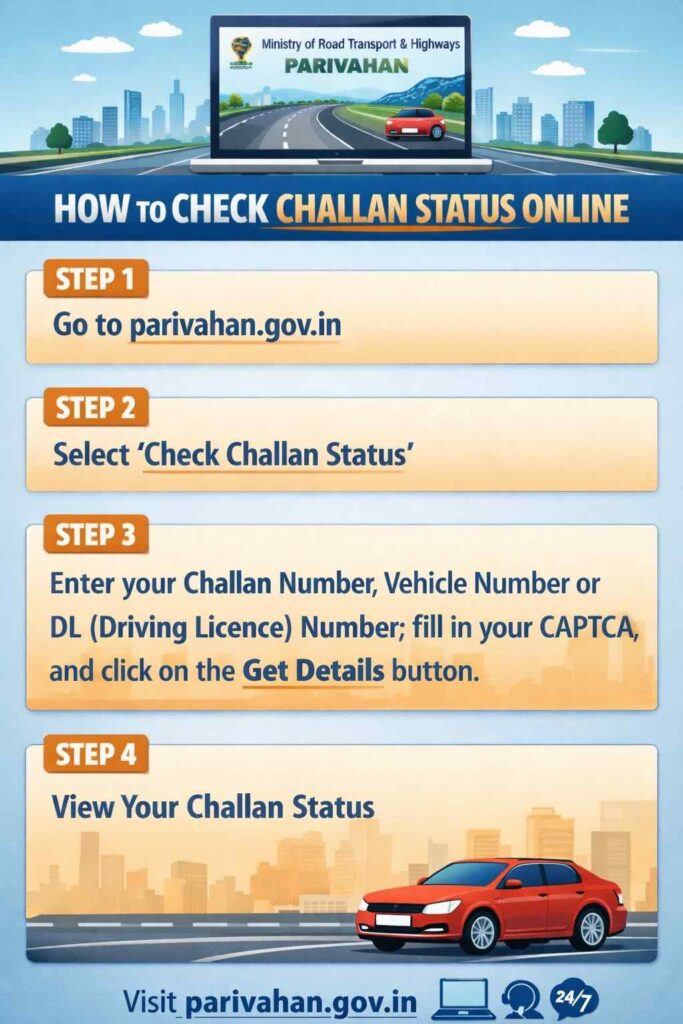
- Go to the official website of the Ministry of Road Transport & Highways by visiting https://parivahan.gov.in/.
- In the header menu bar, you will see an option that reads ‘Online Services’; click on it.
- Under the section of Check Online Services, you will see an option that reads ‘Check Challan Status’; tap on it and go to the next page.
- Enter your Challan Number, Vehicle Number or DL (Driving Licence) Number; fill in your CAPTCHA; and click on the Get Details button.
Why is an e-Challan issued?
E-challans are issued for vehicles violating the RTO rules. It is done to ensure maintaining discipline on roads, reduce corruption and paper challans, keep digital records of traffic offences, and make fine payment easier online.
An e-challan can be issued against your vehicle if you are found:
- Overspeeding
- Jumping a red light
- Driving without a helmet (for two-wheelers)
- Not wearing a seat belt
- Using a mobile phone while driving
- Wrong parking / no-parking violations
- Driving without valid documents (DL, RC, insurance, and PUC)
- Triple riding on a motorcycle
- Driving on the wrong side
- Overloading passengers or goods
e-Challans Amount
The amount of e-Challan generated against your vehicle depends on the RTO rule you have violated. Refer to the table below to check the penalties under the Motor Vehicles Act of 1988 one has to pay in case of violating certain rules.
| Traffic Violation | Fine for First Offence | Fine for Repeat Offence |
| Driving without licence | ₹5,000 | ₹5,000 |
| Driving without insurance | ₹2,000 | ₹4,000 |
| Driving without helmet (two-wheeler) | ₹1,000 | ₹1,000 + possible licence suspension |
| Not wearing seat belt | ₹1,000 | ₹1,000 |
| Overspeeding (LMV) | ₹1,000 – ₹2,000 | ₹2,000 – ₹4,000 |
| Overspeeding (Medium/Heavy vehicle) | ₹2,000 – ₹4,000 | ₹4,000 |
| Using mobile phone while driving | ₹5,000 | ₹10,000 |
| Jumping red light / signal violation | ₹1,000 – ₹5,000 | Up to ₹10,000 |
| Triple riding on motorcycle | ₹1,000 | ₹1,000 |
| Dangerous driving | ₹5,000 | ₹10,000 |
| Overloading passengers in vehicle | ₹2,000 + ₹1,000 per extra passenger | Higher penalty or prosecution |
| Overloading goods vehicle | ₹20,000 + ₹2,000 per extra tonne | Higher fine and vehicle detention |
| Driving without RC | ₹5,000 | ₹10,000 |
| Driving without PUC certificate | ₹1,000 | ₹2,000 |
| Wrong parking | ₹500 | ₹1,000 |
What details are available on e-Challan?
The e-challan carries many crucial information, which is as follows:
- Challan number
- Vehicle registration number
- Owner name
- Driving licence number (sometimes)
- Date and time of violation
- Location of offence
- Type of traffic rule violated
- Fine amount
- Issuing authority (traffic police/camera)
- Photo or video evidence (if available)
- Payment status (paid or pending)
How to pay e-challan?
The pending e-Challan can be paid easily through the e-Challan portal. The step-by-step instructions are as follows:
- Visit the e-Challan portal by visiting echallan.parivahan.gov.in.
- On the homepage, you will see an option that reads ‘Pay Online’ and get redirected to the next page.
- Enter your vehicle number, DL number or challan number and click the Get Details button.
- All your pending e-challans will be before you; tap on the one for which you want to make payment.
- Click on the Pay Now button and choose a payment gateway such as UPI, debit card, credit card or net banking.
- Pay the e-Challan and download the receipt for further reference.