
A driver’s license is an important document without which it is illegal to drive any vehicle on a public road. All the driver’s license holders have to get it renewed before the expiry date. If you have applied for renewal and want to check its status, then you have come to the right place; we have discussed it in detail here.
Here, we have shared the complete process to check the driving license renewal status, when you can expect to get your new driving license, and much more. Make sure you read this article completely so that you do not miss any important details regarding the renewal of your driving license.
Driving License Renewal Status
A driving license is valid for 20 years after it’s issued, and a new one must be obtained before it expires. When applying for renewal, it typically takes approximately 7 days to process. If you’ve applied for renewal of your driving license and want to know where your renewal process stands, you can do so easily.
To check the DL renewal status, you just need to have basic details available, such as your application number and date of birth. After applying for DL renewal, it takes 2 to 3 days for verification of application, 3 to 7 days for getting approval from RTO, 2 to 5 days for printing of new DL, and 5 to 10 days for receiving it by post.
How to check the driving license renewal status in 2026?
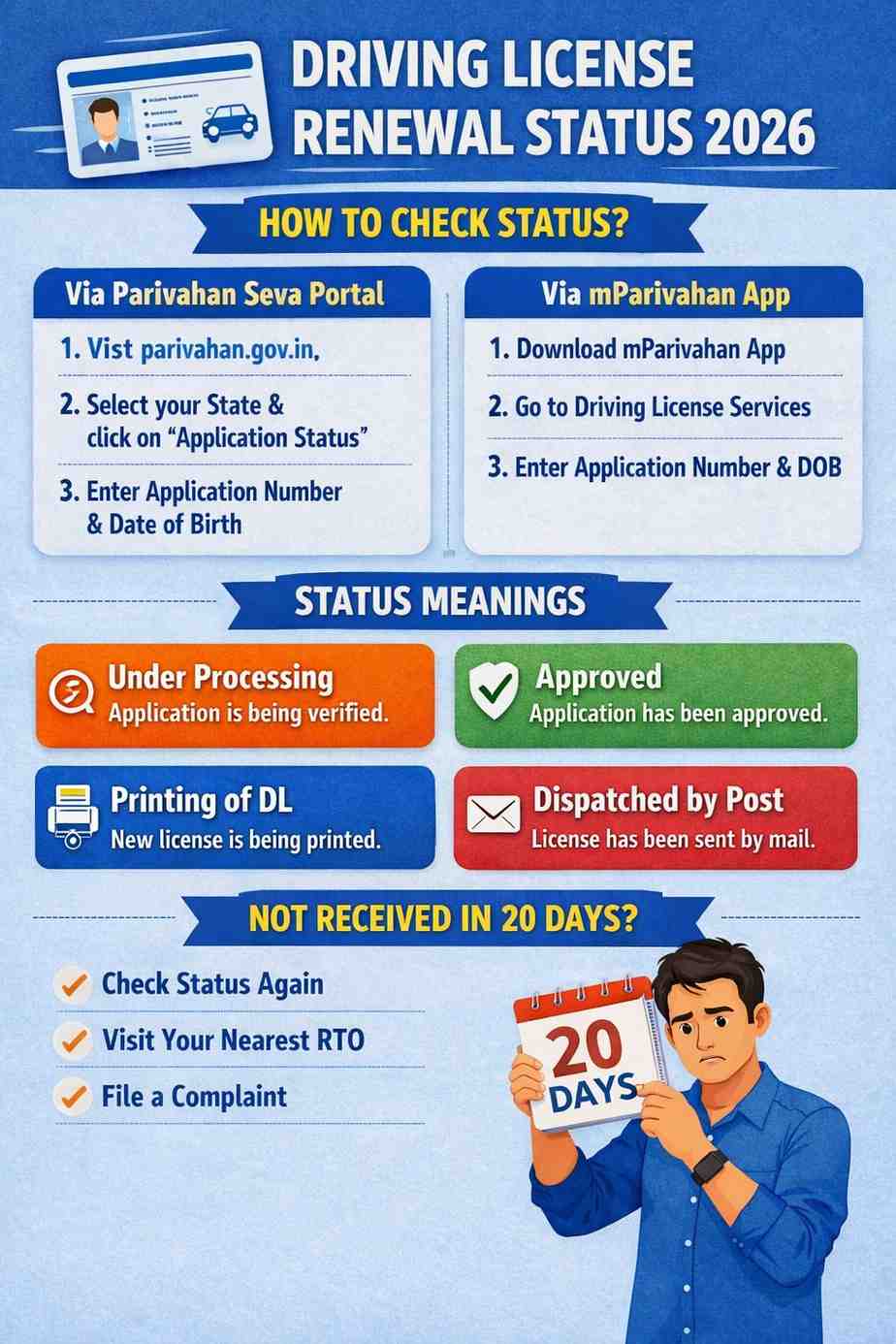
There are two ways to check your driving license renewal status: first, you can check it by visiting the Parivahan Seva portal or by downloading the mParivahan application. We’ve shared step-by-step instructions for both below.
Via the Parivahan Sewa portal:
- First of all, go to the Parivahan Seva portal, which is https://parivahan.gov.in/.
- On the home page, you will see the option of Driver’s/Learner’s License; click on it and reach the next page.
- Now you will get the option to select the state from the drop-down menu.
- By selecting Use your state, you will be directed to another web page.
- Click on the license menu option; next to it the application status will appear in front of you. Click on it.
- Finally, you will have to enter your application number and date of birth, next to which fill the captcha shown on the website and click on the submit button.
Via the mParivahan mobile application:
- Download the mParivahan mobile application from the Play Store or App Store for your mobile device.
- After running the application, you will see the option of driving license services; click on it.
- Now an application status option will appear in front of you; click on it to reach the next page.
- Finally, you will have to enter your application number and date of birth and click on the submit button.
After following any of the above two step-by-step guides, the status shown to you can be Under Processing, Approved, Printing of DL, or Dispatched by Post.
What’s the meaning of DL Renewal Status messages?
The messages displayed on checking the driving license renewal status are “Under Processing,” “Approved,” “Printing of DL,” and “Dispatched by Post.” The meaning of each has been discussed below.
- Under Processing: It means that your application has not yet been processed by your nearest RTO, i.e., Regional Transport Office. It generally takes 2 weeks after submitting the application.
- Approved: It means that your nearest RTO has approved your card renewal application, and it will be printed very soon.
- Printing of DL: It means that your new driving license has been printed by the RTO and will be sent to you by post very soon.
- Dispatched by post: It means that your new driving license has been sent by post, or you will receive it soon.
What to do if a new DL is not received within 20 days of applying for renewal?
After applying for DL renewal, it takes 20 working days to receive the new DL, public holidays excluded. Also, if you belong to a remote area, it may take extra time than usual to receive your new DL by post. If you feel that you should have received your new DL by now, first check the renewal status and confirm if your new DL has been dispatched.
If your new driving license is still under printing or has not been dispatched, then in this situation you will have to wait for some time; otherwise, you can visit your nearest RTO and complain about the delay in receiving your driving license. Doing so may help you in getting your new DL without waiting for a long while.